
Name-Based Case Searches
The main statewide option is re:SearchTX. You will need a free account or eFileTexas credentials to get in. The official quick guide shows a search bar. It takes a party or case style, attorney, agency, keyword, or case number. Pick Cases for a case-level search. From there, narrow the results using Location, Case Category, and Case Type. When the location filter allows it, choose Franklin County or the specific court. Common surnames can pull in unrelated cases. Before opening details, compare the court, category, filing date, and cause number.
- Sign in or register through the official re:SearchTX portal.
- Select Cases and enter the narrowest name or style available.
- Apply the Franklin location and relevant category or case-type filters.
- Open the case description, then compare the number, court, and filed date.
- Verify the match with the clerk or controlling court document before relying on it.
Franklin County exposes no local name-search form on its docket archive. The County and District Court pages organize their PDFs by year and date instead. If a name-only search fails statewide, take it to the correct clerk rather than to blind browsing or a payment site.
| Search control | Type | Required | Use |
|---|---|---|---|
| Search bar | Text | Yes | Name, style, cause number, attorney, agency, or keyword |
| Location | Filter | No | Narrow to Franklin County or a named court |
| Case Category | Filter | No | Reduce unrelated subject areas |
| Case Type | Filter | No | Refine within a category |
Franklin County re:SearchTX Basics
re:SearchTX splits its results into Cases, Filings, Text, and Hearings. Each tab answers a different question. Cases locates the case record. Filings targets docketed documents or filing information, while Text searches indexed content where access permits. Hearings focuses on settings. Clicking a case description opens Case Details. Clicking a filing or hearing type opens its matching detail view. The guide also shows export-results and save-search controls. Those can help you track a public Franklin County matter. Still, a saved query reflects only portal coverage and filters, not a promise that every later filing will appear.
The official re:SearchTX portal is the source of the Franklin County docket-search interface. Its search fields come from the portal as well.
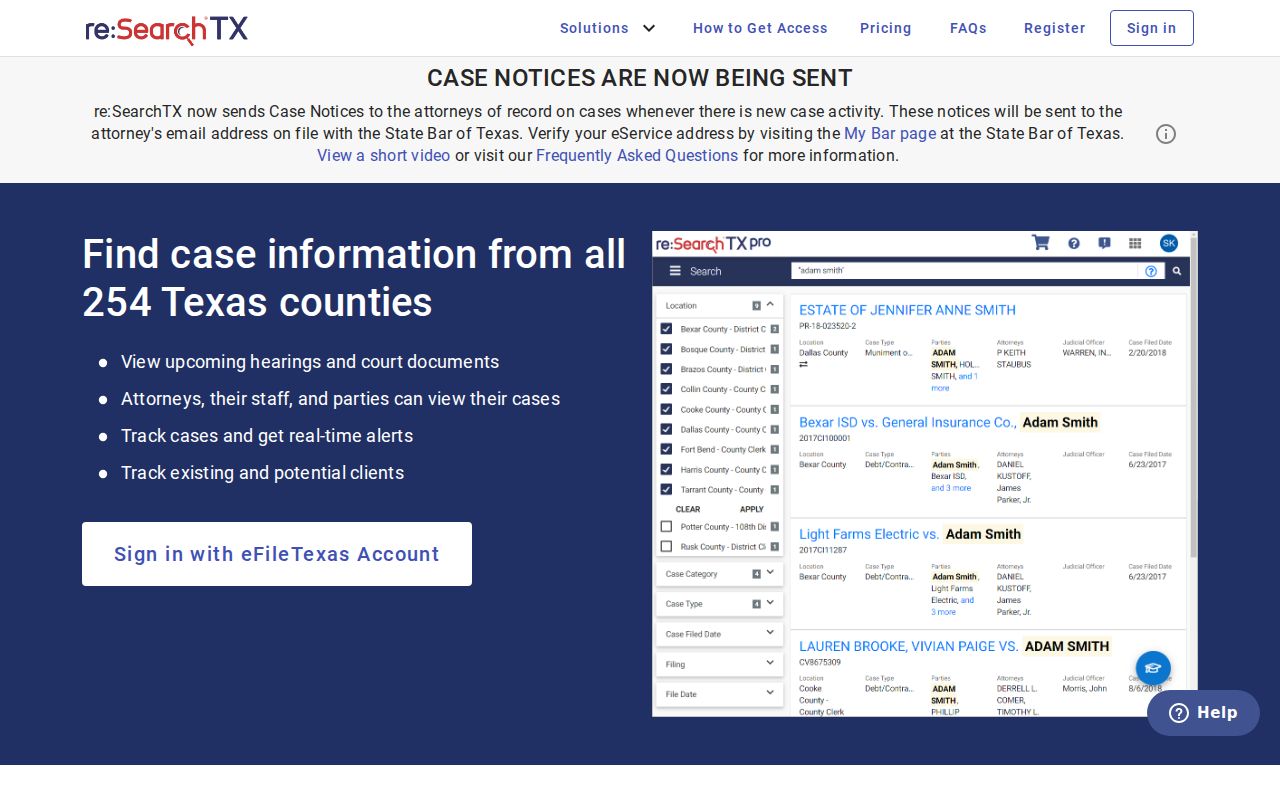
The account screen is a gateway to statewide search tools, nothing more. Registration does not make every document public or free. OCA material describes public document purchases at ten cents per page. A one-dollar minimum applies per document. The same material describes a very large civil public-document collection that excludes criminal case records. So a missing Franklin County felony image proves nothing. The case or filing may still exist.
Case Number Searches
A cause number is the most precise Franklin County docket-search key. Enter it exactly as printed on the notice, pleading, citation, or order. Punctuation stays in where the system accepts it. Franklin County has no single universal format spanning County, District, Justice, municipal, and older files. Never invent year or case-type segments. A safe sample is simply CAUSE-NUMBER-AS-FILED. If the portal rejects punctuation, try the same official value with the separators removed. Then confirm the court and parties that come back.
Pair the number with court level and approximate year. County Court probate, civil, and Class A/B misdemeanor records route through the County Clerk. Felony, district civil, family, and juvenile files route through the District Clerk instead. A municipal or Justice Court number may follow another local design and never reach the county archive at all.
Best search key: Copy the complete cause number from a court-issued document, select Franklin County, and verify the court before opening a result.
Franklin County Docket Search Portal
The County Clerk Records Public Access portal is separate from re:SearchTX. The Clerk describes search and viewing without a stated search charge, plus paid online printing, account registration, subscriptions, and pay-as-you-go access. The portal's live disclaimer gate presents its search fields only after you accept the terms. Follow the current on-screen controls. Do not assume a field exists.
The portal serves the County Clerk's public-record system. The Clerk's court-record page specifically covers County Court probate, civil, and Class A/B misdemeanor records. District files belong to the District Clerk. Online printing is not certification. If you need a formal copy, use the Clerk's request form and state the exact document and the certification you want.
Franklin County's Records Public Access system changed in November 2025. That change alone does not mean every old court docket migrated or became remotely available.
Franklin County Case Search Results
Treat a result row as a locator, not an answer. Open the detail view. Compare several fields before trusting it as the intended Franklin County case. Similar names can mislead. So can delayed uploads, transferred matters, and changed settings. For an outcome question, the controlling judgment or order beats any result list.
| Cause Number | The court's file identifier and best cross-check for a match. |
|---|---|
| Style or Parties | The case caption, subject to common-name and privacy concerns. |
| Case Type | The category, such as civil, probate, family, or criminal. |
| Filed Date | The date the case or filing entered the court system. |
| Status | A portal label that may need clerk or document confirmation. |
| Hearing | A scheduled event that may later be reset or cancelled. |
A docket entry reports that something was filed, set, or recorded. It does not establish that an allegation is true. Labels like open, closed, or disposed may also lack the detail a formal purpose requires. When the exact ruling matters, request the signed document.
Franklin County Offline Search Paths
Online portals sometimes come up empty. That is not the end of the road for a Franklin County court docket search. The County Clerk keeps a public records room where anyone can search in person. Its request form also travels by mail or email. It covers the County Court record categories it covers. Copies never go out over the phone; the form says so plainly. Expect a search fee where one applies, with delivery by mail, non-certified email, or pickup. Follow the Clerk's stated online-payment and identification steps. Send ID only through the official channel.
The District Clerk works out of the Franklin County Courthouse Annex West. It sits at 204 Texas Highway 37 in Mount Vernon. The phone there is 903-537-8337. The County Clerk sits at 200 N Kaufman Street, phone 903-537-8357. Posted hours for the records room and office vary from page to page. Call ahead before any court deadline. The courthouse has also posted a temporary elevator notice; plan for it.
- Use the County Clerk for County Court probate, civil, and Class A/B misdemeanor files.
- Use the District Clerk for felony, district civil, family, and juvenile files.
- Use the Justice Court for traffic, small claims, debt claims, and evictions filed there.
- Use the issuing municipal court for Mount Vernon or Winnsboro citations.
- Use the originating court or clerk when a sealed or restricted record requires authority.
Franklin County and State Case Search
Franklin County offers two main electronic routes into court records. They overlap, but each has its own reach. A smart Franklin County docket search starts with the route matching the court, then runs the other as a cross-check when it helps.
| Point | re:SearchTX | County Clerk portal |
|---|---|---|
| Scope | Participating Texas courts | Franklin County Clerk system |
| Entry | Free account or eFileTexas credentials | Disclaimer and current portal controls |
| Best use | Cases, filings, text, and hearings with filters | County Clerk public records and online views |
| Limits | Role, case type, integration, and paid pages | Not every district or criminal record; fields may change |
| Certified copy | Not the default result | Use the Clerk request route |
One deadline shapes the timeline here. The Texas Supreme Court integration order gave counties under 60,000 a November 2025 deadline. Franklin County sits in that population tier. Still, a deadline alone promises nothing about what you will actually find; local rollout, access rules, and document type all shape the results a Franklin County docket search returns.
Franklin County Search Forks
Know what each tool actually does. The date-based County Court Dockets and District Court Dockets pages serve one purpose. They confirm which schedule PDF was posted for a date. Neither searches by name or case number. The same caution applies to payment sites like JP GovRec, Mount Vernon Government Payment Services, and Winnsboro FastGovPay. These sites take payments, and they do nothing beyond that.
Appeals live on a separate system entirely. Texas appellate Case Search spans three bodies. It covers the Supreme Court, the Court of Criminal Appeals, and the Courts of Appeals. Franklin County appeals normally land at the Sixth Court of Appeals. There you can query by appellate case number, partial number, style, attorney, trial-court number, county, or date. An appellate result does not replace the trial-court file itself.
Federal dockets are a different world again. Use PACER or the Eastern District of Texas; Franklin County falls in the Texarkana Division. A blank county or state result tells you nothing. It says nothing about a federal case.
Which Franklin County Cases Stay Restricted
Access rules depend on the category of case. Texas Rule of Judicial Administration 12 opens judicial records unless an exception applies. Other court rules, statutes, and orders still govern filed case records. Civil files can be sealed under Rule 76a. Family Code chapter 58 shields juvenile information. Adoption, child-protection, expunction, nondisclosure, and sealed material may be missing, redacted, or limited.
A public docket can list that an event happened while keeping the document image to itself. An eFileTexas filer may also view records through a case role the general public cannot use. Filing access is not the same as public access. When a result is restricted, ask the custodian what authority applies. Avoid entering a full birth date, driver-license number, employer address, or financial data into public-facing fields more than once.
Note: a name match is a lead to verify. It is never proof of identity, conduct, or outcome.
Missing Franklin County Docket Results
Start with the basics before assuming a Franklin County docket is missing. Check spelling and punctuation. Then check the cause number, year, location, case category, and court. Switch among Cases, Filings, and Hearings as your goal shifts. The location you want may not be visible at first. Review the “Next 10” filter choices. Only save or export a result after confirming it points to the right public case.
When nothing appears, figure out which office holds the record. It may sit in a different court. Or it may be outside portal coverage, too new to sync, transferred, sealed, expunged, or federal. Reach for the County Clerk form, the District Clerk, Justice Court, the municipal clerk, appellate search, or PACER. Pick whichever the facts demand. Ask the clerk directly. Does “not found” mean no public record exists, or simply no online result?
Search safely. Provide the minimum facts needed to identify the file. Keep sensitive identifiers in the official clerk channel, and verify any result against the originating court record.